Your WordPress site.
More ideas. Less routine.
Agent News SP is a WordPress plugin for preparing article text and images on your own website. Take your next idea from topic to review, with more time to focus on what you want to say.
For your first WordPress website, your personal blog or a busy small business: describe your idea, follow the on-screen steps and review what you want to publish.
Install the plugin on your WordPress website; no other AgentWP plugin is required for the article workflow. Bring your own supported AI provider account and API key. Provider usage is charged separately.
Your next idea doesn’t need a desk.
A quiet moment by the sea. An idea on your commute. Open your WordPress site’s Quick Mode in your phone’s browser and turn it into a draft while the thought is still fresh.

Speak it. Shape it. Make it yours.
Type your topic, or dictate where your browser supports it. Choose the article language, style and length. Prepare text and images, then review and edit the result.
Your topic. Your own WordPress workflow.
Quick Article keeps the topic and preparation controls together. Use your own site account and supported provider settings. Internet access is required; device and browser support should be checked before relying on a mobile workflow.
For your site. For your next social post.
Prepare material for a website article or an Instagram or Facebook post. Review your text and image, then use the available export options or publish to your WordPress site. Keep your ideas moving.
More room for life around you.
You don’t have to wait until you are back at a computer to start writing. Capture the idea now, save a draft and return to it when it suits you.
The seaside scene illustrates the idea of writing away from a desk; it is not a product screenshot or proof of a separately downloadable phone app. AI provider usage is charged separately.
Your language. Your everyday life.
On the bus, beside the water or over a coffee. Start with an idea in the language your readers know.

Choose from 16 article languages, separately from the interface language. Shape your content for the people you want to reach.
English · Українська · Русский · Polski · Deutsch · Español · Português · Français · Italiano · 中文 · 日本語 · 한국어 · हिन्दी · עברית · العربية · Bahasa Indonesia
Articles for your WordPress site, from your own ideas.
Preparing an article involves more than generating words. Choose your approach, prepare the material and review the result in one WordPress workflow. Agent News helps with the preparation; your judgment shapes what readers see.
Start simply, or take it step by step.
Use Quick Article for a shorter path, or the guided Wizard when you want to work through the stages.
Write in the language you need.
Choose the article language separately from the interface language. Select the supported provider options for your task.
Choose the available preparation effort.
Effort is the AI effort level for preparing a response: it lets you ask the model to put more or less work into the task. Where Quick Article offers this setting, choose from the levels supported by your provider or model.
Make the result your own.
Review and edit the text, inspect the images and prepare the article for publication.
Five steps. One thoughtful workflow.
Choose a route
Open Quick Article or the guided Wizard.
Set the task
Choose your topic, supported provider and article language. Where available, choose the AI effort level (Effort) in Quick Article.
Prepare
Work through research, content preparation and supported text and image steps.
Review and edit
Check sources, wording and images. Adjust what needs your attention.
Decide to publish
Use the publication tools when you are ready.
A full-featured image editor.
Built into your writing flow.
Describe the image you have in mind. Then shape its headline, colours and finishing touches without leaving the article workflow.
Start with your own image prompt.
Choose a supported image provider and write a separate description for your illustration. Here is the actual prompt we gave Grok through Agent News SP — followed by the image it created.
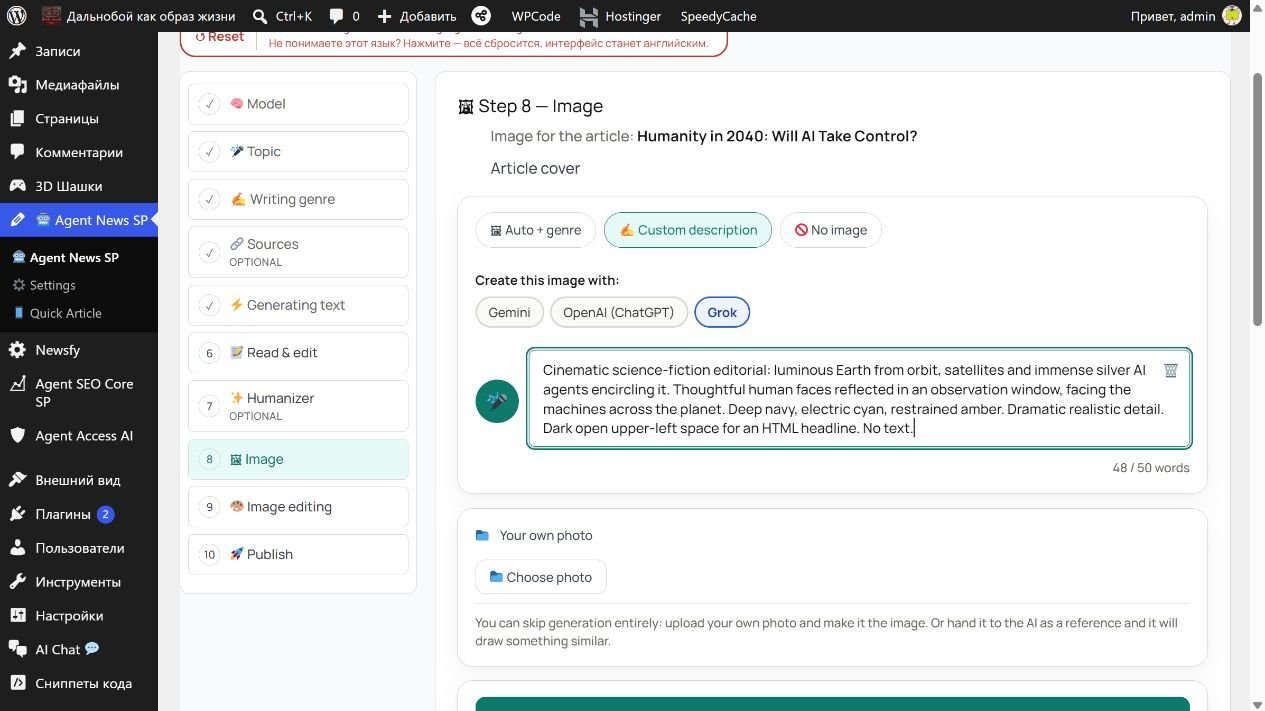

Read the exact image prompt
Cinematic science-fiction editorial: luminous Earth from orbit, satellites and immense silver AI agents encircling it. Thoughtful human faces reflected in an observation window, facing the machines across the planet. Deep navy, electric cyan, restrained amber. Dramatic realistic detail. Dark open upper-left space for an HTML headline. No text.
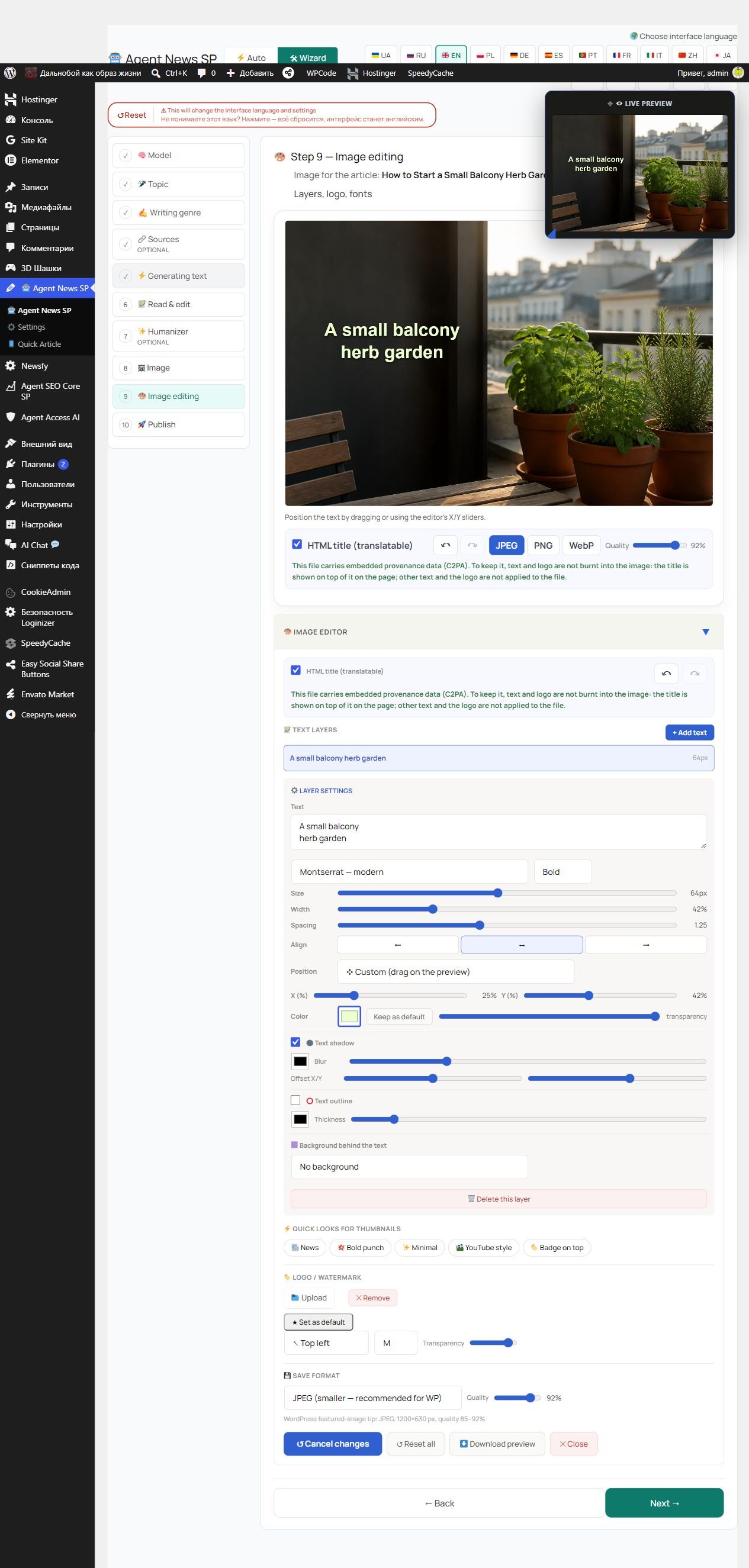
Make the image feel like yours.
- Style your text: font, size, weight, alignment, width and position.
- Find the right contrast: text colour, transparency, background, shadow and outline controls.
- Add your identity: logo or watermark options and quick visual looks.
- Keep headlines as HTML: a separate text layer that your site's translation workflow can translate.
- Choose the output: supported JPEG, PNG and WebP options with quality controls.
Available output options depend on the image and its provenance requirements. HTML text can stay separate from the original image.
Humanity in 2040.
A technology article with a Grok cover, two supporting illustrations, an HTML headline and linked sources.
Read the article →A small balcony herb garden.
A short example with an OpenAI cover and an editable HTML headline, on its own demonstration page.
Open the gardening example →Generation uses your own provider account. See how API keys work, how to connect a provider and what AI usage costs.
An article ready for your decision.
You have text to review and edit, supported image choices to inspect, and a clear publication step. Check facts, sources and image rights before using the result.
Help for your first site—and your busy days.
This WordPress plugin is for people who want to keep a blog, share their work or update a business website with less routine. Choose your topic, prepare a draft and make it your own through the on-screen controls.
Less manual linking. More connected WordPress content.
Agent Linking SP is a WordPress plugin that adds internal links automatically: links from one page of your site to another. Choose the words and destination pages in your rules. Use titles, tags and your own phrases to connect relevant pages without repeatedly editing articles by hand.
Find an opportunity.
Create. Connect.
WordPress plugins that help with different everyday tasks: understand what people search for, prepare articles and connect related pages with links.
Agent SEO Core SP
Explore search data and select target queries for an editorial brief you approve.
Agent News SP
With cooperation enabled, use an approved SEO brief as a starting point for preparing and reviewing your article.
Agent Linking SP
Apply your link rules across supported content, inspect the connections and keep control of changes.
When you enable cooperation, Linking can index newly published News articles, share phrases from existing pages for writing, and provide link-structure facts to SEO Core. Each product also works independently; you choose which connections to enable. To use the plugins together, you must allow them to work together and have valid access to each participating paid plugin. It has no separate cooperation fee or expiry timer.
Linking → News
Phrases from existing pages
Linking → SEO Core
Facts about the site’s link structure
You choose which connections to enable. Each plugin can also work on its own.
Explore the product. Choose when it is ready.
This is a product presentation. Purchases and paid-plugin downloads are not open here.
Agent News SP
Planned options: $12 for one year or $30 for three years.
These are provisional launch prices. Final licence scope and terms will be shown before ordering. No free trial is currently offered.
The AgentWP paid product family
A planned family subscription, separate from the individual-product options.
Included products and final terms will be confirmed before ordering.
Your plugin. Your API key. Your AI account.Agent News SP helps you prepare content in WordPress. You connect the AI service with your own API key in your site’s plugin settings; requests use your provider account and balance. AI provider usage is charged separately. A paid term keeps its agreed price for that term; renewal uses the price disclosed at that time. Nothing on this page starts a subscription or a provider call.
Review requirementsBring your site. Choose your provider.
What you need
A WordPress website that allows plugin installation, administrator access to install the plugin, and your own account and API key for a supported AI provider. Check the released package requirements and compatibility with your site before installation.
Where generation happens
Material you submit for generation is processed by the external AI provider you select. Review what you send and the provider's terms. Provider usage is charged separately.
New to WordPress plugins? Start here.
A plugin adds features to an existing WordPress website. When a released ZIP is available, sign in to your site as an administrator, open Plugins → Add New → Upload Plugin, select the ZIP and follow the installation and setup instructions. Check your hosting plan and permissions if plugin installation is unavailable. WordPress installation guide.
Before you get started.
I do not have a WordPress site yet. Where do I start?
Start by creating a WordPress website on hosting that lets you install plugins. Then add the plugin to that site and follow its setup instructions. A plugin adds features to your website; the domain name and hosting are arranged separately.
Create your first WordPress website on Hostinger: a simple illustrated guide.
Is this an app for my computer or phone?
Agent News SP is a plugin installed on a WordPress website. After installation, you use its tools through that website in your browser. Quick Mode is part of the plugin on your site; a phone can access it through a supported browser and your site account. Downloading the ZIP alone does not create a website or install a phone app.
Can I use Agent News without other AgentWP plugins?
Yes. Install Agent News SP on your WordPress website. The article workflow does not require another AgentWP plugin.
Do I need an API key? Is AI usage included?
An API key connects the plugin on your WordPress website to your chosen AI service. Use your own account and key for a supported provider. AI usage is paid separately to that provider. See the setup steps and real provider screens.
How are Quick Article and the Wizard different?
Quick Article offers a shorter route. The Wizard guides you through article preparation in stages.
Can I choose the article language?
Yes. The article language is separate from the interface language.
What is Effort, and does every provider offer the same levels?
Effort means how much effort you ask the AI model to put into preparing its response. Think of it as the requested level of work on the task, rather than the length of your article.
The available levels are not the same for every AI service or model. Quick Article shows the options supported by the provider or model you selected.
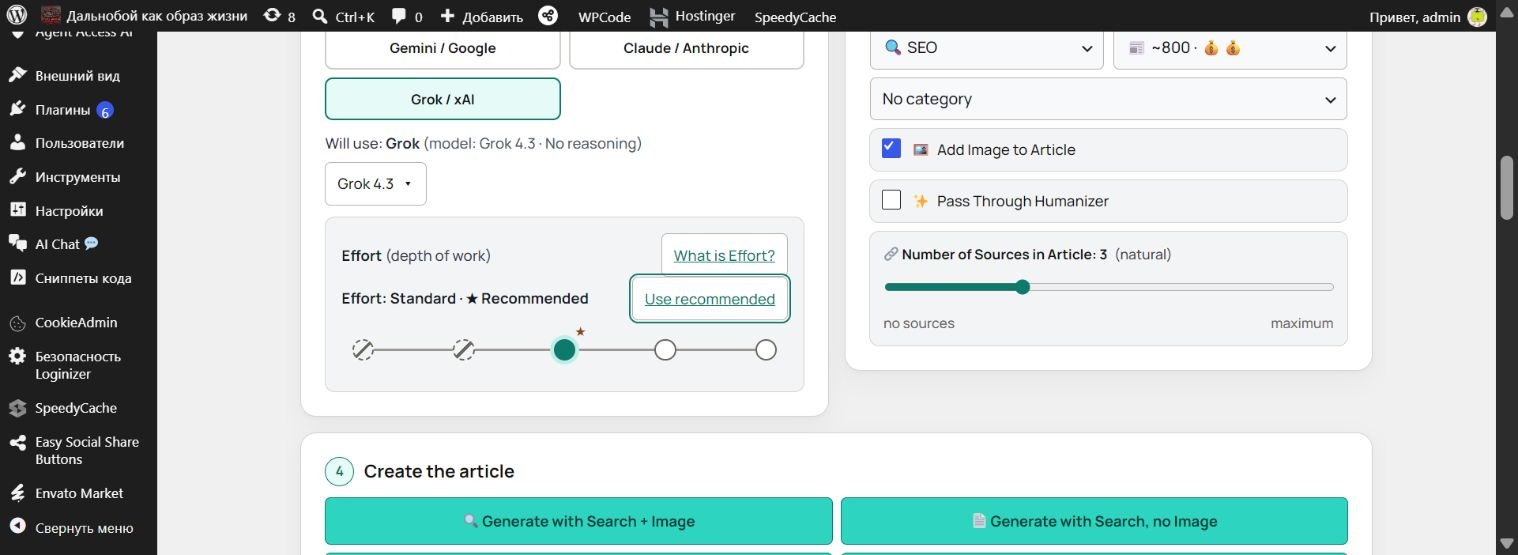
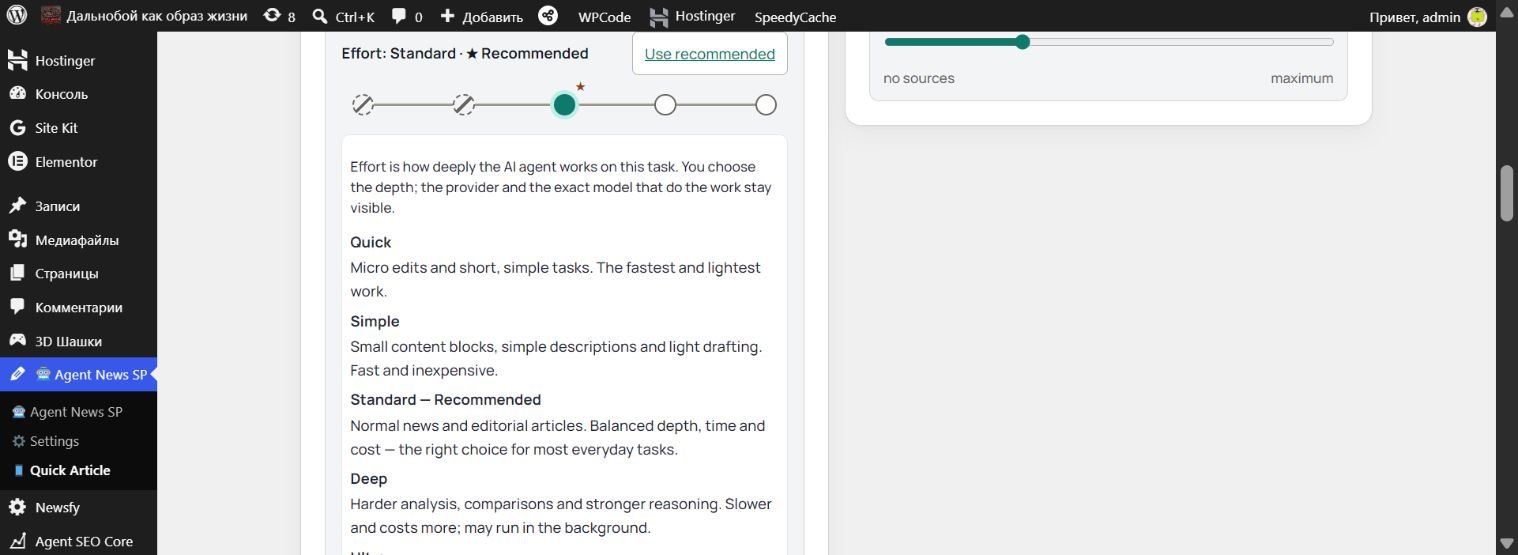
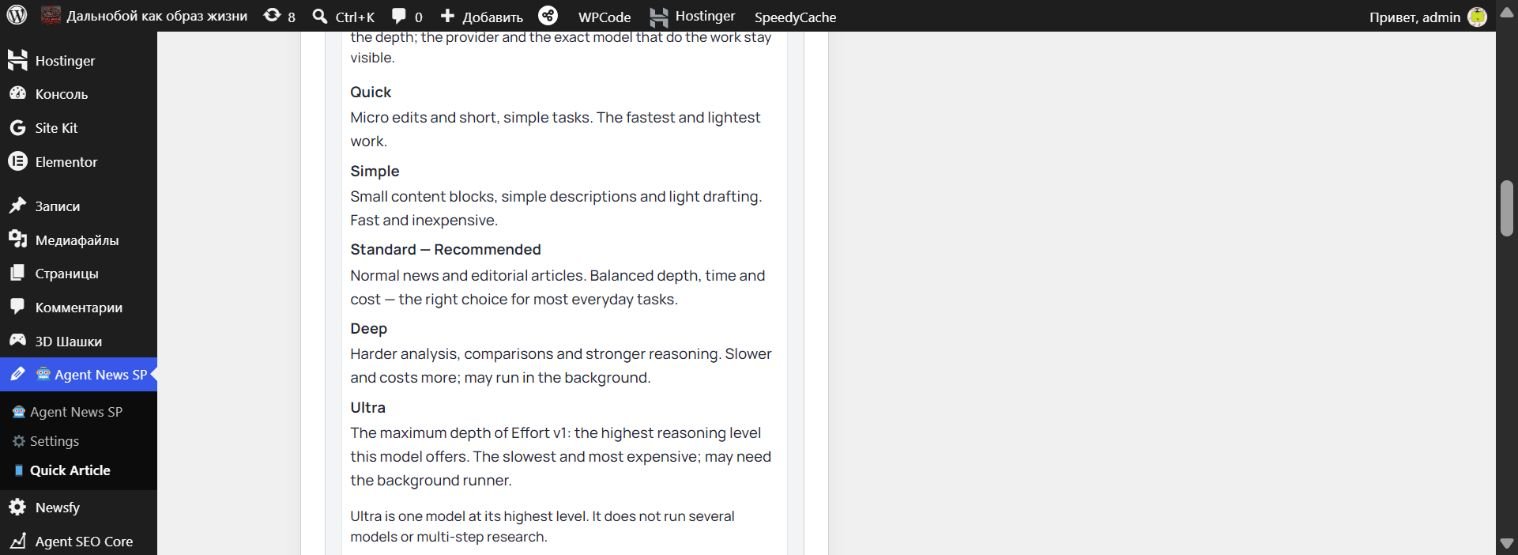
Real Quick Article screens captured on 12 October 2026. Select a screenshot to enlarge it.
Can I review the text and images before publication?
Yes. Review and edit the text and inspect the supported image choices before making the publication step.
Is generated information guaranteed to be correct?
No. Check facts, sources and image rights before publishing. The preparation tools do not replace editorial judgment.
What information does the external AI service receive?
The AI service you selected receives and processes the material sent to it to carry out your generation task. This can include the instructions and material from a brief you chose to use.
Built for our work. Made for yours.
We develop AgentWP for our own publishing and website work — and for yours.
Explore our tools for preparing articles and images, helping visitors and handling everyday WordPress tasks. Bring the capabilities that fit your work to your own site.
Free WordPress plugins for everyday tasks.
Add useful features to your WordPress website. Each plugin below is installed through your site’s WordPress admin and works on that website.

Agent Auto Tag
A free WordPress plugin that suggests tags already used on your site, so you can add relevant ones without starting from scratch.

Agent Auto Alt Text
A free WordPress plugin that suggests missing image alt text from filenames, while preserving descriptions you wrote yourself.

Agent Smart Excerpt
A free WordPress plugin that creates and previews short article summaries locally, helping you prepare excerpts without an AI service.

Agent Broken Link Alert
A free WordPress plugin that finds broken external links in posts and pages, so you know which references need attention.

Agent Content Refresh
A free WordPress plugin that highlights posts that have not been updated for a while, helping you choose what to revisit.

Agent Image Saver
A free WordPress plugin that copies external images used in a post into your media library and updates the post to use your copies.
Free WordPress plugin downloads are not available yet. When released, upload the plugin ZIP through your WordPress admin. You need a WordPress website with permission to install plugins.
WordPress plugin download
Agent News SP
Agent News SP adds AI-assisted article preparation to your WordPress website. The download is a plugin package to install on that website.
The WordPress plugin download is not available yet. A WordPress website, plugin-installation access and a supported provider API key are required.
Let your next article start with an idea.
Bring your provider. Let Agent News help with the preparation. Review the result and publish when you decide.